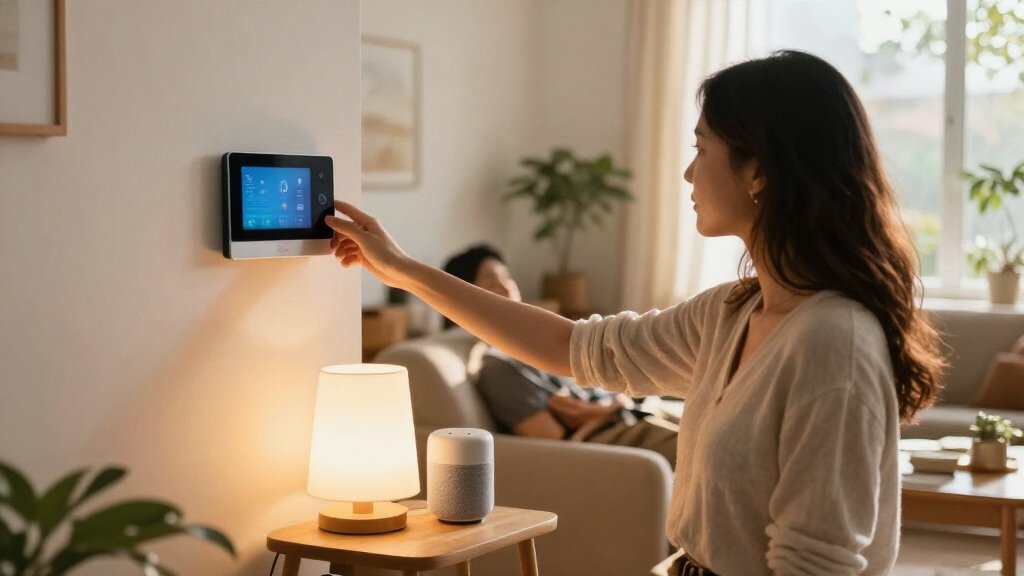

Choosing smart home devices is partly a choice about how much freedom you want over the system that connects them. Matter-compatible devices are designed to work with multiple participating platforms, while proprietary devices are built around a particular brand’s app, hub, or voice assistant. That distinction affects more than setup: it shapes which devices you can combine, which features are available, and how much flexibility you retain if your preferences change.

Get the little things that make your day delivered free with Prime
- Fast, free delivery on millions of items
- Prime Video, Amazon Music and more included
- Member-only deals all year

Amazon Echo Hub 8-inch Smart Home Control Panel
- ✔ Display: 8-inch touchscreen, 1280 x 800
- ✔ Connectivity: Dual-band Wi-Fi, Bluetooth, Zigbee, Thread, Matter, Amazon Sidewalk
- ✔ Audio: Pair of top-ported full-range speakers with stereo playback
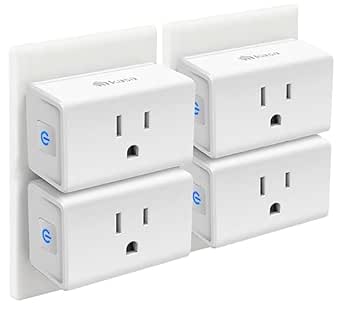
Kasa Smart Plug Mini EP10P4, 15A, 4-Pack
- ✔ Model: EP10P4
- ✔ Pack size: 4 plugs
- ✔ Maximum current: 15 A

Kasa Smart Plug HS103P4, 4-Pack, Wi-Fi Outlet, Works with Alexa and Google Home
- ✔ Model: HS103P4
- ✔ Pack size: 4 plugs
- ✔ Operating voltage: 120 V AC
Matter is a connectivity standard, not a guarantee that every feature works everywhere. A device may support basic controls across platforms but reserve advanced settings for its manufacturer’s app. Proprietary devices can offer a more polished experience when you commit to one ecosystem, though expanding the system may mean buying within that brand’s catalog. This comparison looks at compatibility, features, setup, reliability, cost, privacy, and long-term flexibility. Choose Matter if you want options across platforms; choose proprietary devices if a specific brand’s features and integration matter more than portability.
At a Glance
| Criteria | Matter-compatible smart home devices | Proprietary smart home devices | Winner |
|---|---|---|---|
| Platform compatibility | Designed for participating platforms; exact support varies by device and controller | Usually strongest within the maker’s own platform; third-party support varies | A |
| Features and controls | Common controls are shared, while some advanced features remain app-specific | Often offers deeper brand-specific automation, settings, or accessory integration | B |
| Setup and everyday use | Can be straightforward with a compatible controller; setup paths vary | Can be simple when the home already uses that brand’s app and hub | Depends |
| Reliability and local control | Matter can support local control, but performance depends on the device and network | May offer dependable integration within its own system; network and cloud needs vary | Depends |
| Upfront cost and value | Broad choice across brands; value depends on supported features and required hardware | May cost more or limit alternatives, but bundled features can justify the premium | Depends |
| Privacy and data handling | Standard compatibility does not dictate a brand’s data practices | Depends on the company’s policies, account requirements, and cloud design | Depends |
| Long-term flexibility | Easier to mix supported brands and change platforms for basic functions | Greater dependence on the brand’s product range, app, and support | A |
Amazon Echo Hub 8-inch Smart Home Control Panel
The Echo Hub is the most capable automation centerpiece in this group. Its 8-inch touchscreen gives household members a shared place to see and adjust compatible devices, cameras, routines, security systems, and media. That makes it a different kind of purchase from either Kasa plug pack: instead of automating a few outlets, it can bring compatible parts of a broader setup into one visible control point.Its protocol support is the main reason we rank it first. Built-in Zigbee, Thread, and Matter, alongside Wi-Fi and Bluetooth, can reduce the need for a separate hub for compatible devices. The Kasa plugs are easier to place and require no hub, but their role is narrower: app or voice control, schedules, and timers for connected appliances over Wi-Fi. Buyers should still check that their specific devices and services are compatible; a list of supported protocols does not make every smart home product work automatically.The tradeoff is installation and dependence on connectivity. The Echo Hub is designed for a wall or a fixed surface, and setup requires internet access. A tabletop stand is sold separately, and some buyers may need additional cable or power accessories for their preferred installation. We’d skip it if our goal is simply to automate a few lamps; the EP10P4 or HS103P4 is a more direct fit for that job. For households seeking one shared interface and broader device coordination, the Hub offers the widest automation role here.
Pros:
- 8-inch touchscreen provides a shared visual control point.
- Built-in Wi-Fi, Bluetooth, Zigbee, Thread, and Matter support.
- Wall mount and power adapter are included.
- Customizable controls and multiple privacy controls, including a mic-off button.
Cons:
- Internet connection is required for setup.
- Not intended for handheld or portable use.
- Tabletop stand, cable pass-through, and PoE converter are separate accessories.
Best for: Households building a mixed smart home that want a shared touchscreen and built-in support for several device protocols.
Not ideal for: Shoppers who only need to schedule a few appliances, need a portable controller, or cannot rely on internet access during setup.
Bottom line: We recommend the Echo Hub when broad device coordination and a shared screen matter more than a minimal, outlet-only setup.
“We recommend the Echo Hub when broad device coordination and a shared screen matter more than a minimal, outlet-only setup.”
Kasa Smart Plug Mini EP10P4, 15A, 4-Pack
For buyers who want useful automation without installing a control panel, the EP10P4 is the most practical plug pack in this lineup. Its compact design is a meaningful advantage when a wall socket has two outlets: the plug is designed to leave the second one available. Four plugs make it possible to automate several lamps or small appliances in one step, while schedules, timers, and Away Mode add more routine options than simple remote switching.Compared with the Echo Hub, this pack is much easier to place and does not require a separate hub. Compared with the HS103P4, it has a stated 15 A maximum current, support for both Kasa and Tapo apps, and the compact form factor called out in the product details. Those distinctions make it a strong choice for outlet-level automation, though it cannot serve as a touchscreen controller or coordinate devices over Zigbee, Thread, or Matter.There are limits to that simplicity. Setup and app control require Kasa or Tapo, and the plugs depend on 2.4 GHz Wi-Fi; buyers with a different network setup should check compatibility first. The listed maximum wattage is 1800 W, but buyers should follow the device’s own limits and use the plug only with suitable appliances. We’d choose this over the HS103P4 when outlet clearance and the specified current rating are deciding factors. For a display-led system or broader protocol support, the Echo Hub is the better match.
Pros:
- Compact shape is designed to leave the second standard outlet available.
- Four plugs support automation in multiple rooms or locations.
- Schedules, timers, Away Mode, app control, and voice control are supported.
- UL certified and made with flame-retardant materials.
Cons:
- Requires a 2.4 GHz Wi-Fi connection.
- Kasa or Tapo app is required for setup and app control.
- Not a substitute for a multi-protocol smart home hub or control screen.
Best for: People who want to automate several lamps or suitable small appliances while keeping the neighboring outlet accessible.
Not ideal for: Buyers seeking a central touchscreen, non-Wi-Fi device control, or setup that avoids Kasa or Tapo apps.
Bottom line: We’d pick the EP10P4 for straightforward multi-outlet automation when compact fit and the stated 15 A capacity are priorities.
“We’d pick the EP10P4 for straightforward multi-outlet automation when compact fit and the stated 15 A capacity are priorities.”
Kasa Smart Plug HS103P4, 4-Pack, Wi-Fi Outlet, Works with Alexa and Google Home
The HS103P4 keeps smart home automation focused on a familiar task: switching suitable appliances on a schedule or by app and voice. Its four-plug pack and hub-free Wi-Fi setup make it a straightforward way to add control to lamps, fans, humidifiers, and similar devices. For readers who want to automate several outlets without planning a larger system, it is the most direct entry in this comparison.It shares the EP10P4’s basic appeal, including Kasa app access, voice compatibility with Alexa and Google Assistant, and 2.4 GHz Wi-Fi. The EP10P4 is the stronger choice when compact outlet clearance, Away Mode, or a stated 15 A maximum current is important. The HS103P4’s supplied details emphasize timers and schedules, so it makes sense when those core routines are enough and the more specific physical distinction of the Mini is not a priority.This plug pack cannot replace the Echo Hub’s visual dashboard or its support for Zigbee, Thread, and Matter devices. It also depends on a compatible 2.4 GHz network and requires an app setup, so it is not a solution for buyers avoiding Wi-Fi-based control. The supplied specifications list 1800 W maximum but do not state a maximum current, so we would check appliance and plug requirements before connecting a particular load. For simple schedules across several everyday appliances, the HS103P4 stays approachable; for more explicit capacity and compact-fit details, the EP10P4 is easier to assess.
Pros:
- Four plugs support automation for multiple appliances.
- No separate hub is required.
- Kasa app control, voice operation, timers, and schedules are supported.
- Works with Amazon Alexa and Google Assistant.
Cons:
- Requires 2.4 GHz Wi-Fi.
- App requirements list Android 5.0 or later and iOS 10.0 or later.
- The supplied specs do not state a maximum current rating.
Best for: Buyers who want a hub-free four-pack for scheduling compatible lamps, fans, humidifiers, and similar appliances.
Not ideal for: People building a multi-protocol smart home, needing a touchscreen, or prioritizing a compact form with a specifically stated current rating.
Bottom line: We recommend the HS103P4 when scheduled outlet control is the goal and a central hub or compact-fit distinction is unnecessary.
“We recommend the HS103P4 when scheduled outlet control is the goal and a central hub or compact-fit distinction is unnecessary.”
As an Amazon Associate we earn from qualifying purchases.
Key Differences
The clearest advantage of Matter is choice across supported ecosystems. If you use, or may later adopt, a compatible Apple, Google, Amazon, or other controller, Matter can reduce the risk that a basic device becomes stranded in one manufacturer’s app. That is especially useful when different household members prefer different platforms or when you want to add devices from several brands. The limit is feature parity: a shared standard does not mean every controller exposes every setting.
Proprietary devices have the stronger case when their distinct functions matter. A brand may offer detailed energy reports, unusual sensor actions, or tightly linked routines in its own app. Those benefits can make daily control easier, but they come with dependence on that company’s catalog, software, and account model. For many households, a mixed approach makes sense: choose Matter for common lights, plugs, and switches, then buy proprietary products where the added features solve a real need.
Neither label guarantees reliable service, privacy, or low cost. Matter’s local-control capabilities can reduce reliance on cloud services for supported actions, but the hardware and controller still matter. Proprietary products vary just as much: some work locally, while others depend heavily on internet access. Compare the precise device, its supported functions, hub requirements, and data policies before purchase.
Detailed Comparison
Platform compatibility (Matter-compatible smart home devices wins — major)
Matter wins by design: compatible devices are intended to join participating smart home platforms, giving buyers more choice in controllers and brands. The advantage is major for households that already mix ecosystems or may switch later. Compatibility is not universal, though; confirm that the exact model and the functions you need are supported by your controller. Proprietary devices can still work with other systems, but that support is usually narrower or mediated by integrations.
Features and controls (Proprietary smart home devices wins — moderate)
Proprietary systems often win when a device offers brand-specific controls, detailed automation, or close integration with the maker’s other products. The gap is moderate: ordinary on/off, brightness, or temperature controls may be enough for many buyers, and Matter may expose those across platforms. If you rely on specialized routines or detailed settings, check whether those features appear in your chosen controller or only in the manufacturer’s app.
Setup and everyday use (minor difference)
This is a close call. Matter can simplify adding devices to a compatible controller and may offer more than one setup route. A proprietary device can be equally easy if you already use its app and hub, since it fits an established routine. The difference is minor for a single device and more noticeable when building a larger system. Check hub needs and household phone compatibility before buying; neither approach guarantees a one-step setup.
Reliability and local control (moderate difference)
Neither approach wins automatically. Matter supports local communication for compatible functions, which can keep some controls available without a cloud round trip. Actual behavior depends on the device, controller, and network. Proprietary systems range from locally responsive to cloud-dependent. The practical gap is moderate only when a particular device’s offline behavior is documented and important to you. Look for clear support details instead of inferring reliability from the ecosystem label.
Upfront cost and value (moderate difference)
There is no universal price winner. Matter devices give you a wider pool of brands and alternatives, which can help you find a lower price or avoid replacing working equipment when changing platforms. Proprietary devices can cost more, but the premium may buy a feature, accessory, or smoother integration that you will actually use. The difference is moderate: compare the total system cost, including hubs, subscriptions, and required accessories, rather than the device price alone.
Privacy and data handling (minor difference)
Tie: Matter defines how compatible devices communicate, not how each manufacturer handles accounts or personal data. A proprietary brand may request an account or send certain information to cloud services; a Matter-compatible product may do so as well. The difference depends on the exact product and app, not its compatibility badge. Read the privacy policy and check whether core controls require an account or internet connection.
Long-term flexibility (Matter-compatible smart home devices wins — moderate)
Matter wins for basic functions because supported devices are intended to remain usable across participating platforms. That can reduce the cost of changing controllers or adding a different brand later. The advantage is moderate rather than absolute: app-only features, unsupported device types, or changes in product support can still constrain you. Proprietary systems may remain a sensible choice when you expect to stay with one brand and its catalog meets your needs.
Matter-compatible smart home devices: Pros and Cons
Pros:
- Broader choice of participating platforms and device brands
- Useful foundation for mixed-brand homes
- Can preserve access to common controls if you change platforms
- Supports local control for compatible functions and setups
Cons:
- Feature support can differ between platforms
- Some settings may require the manufacturer’s separate app
- Requires a compatible controller, and some products have extra hub needs
- The Matter label does not establish privacy practices or product quality
Proprietary smart home devices: Pros and Cons
Pros:
- Often provides deeper settings and brand-specific automations
- Can be easy to manage when you already use the same ecosystem
- May integrate closely with the maker’s sensors, hubs, and accessories
- A higher price can be worthwhile when it buys a feature you need
Cons:
- Third-party platform support may be limited
- Expanding the system can make you more dependent on one catalog
- A future platform change may require extra apps or replacements
- Cloud, account, and subscription requirements vary and need checking
Who Should Choose What
Choose Matter-compatible smart home devices if:
- You use devices from multiple brands or want to preserve platform choice.
- You expect your preferred voice assistant or controller could change.
- You mainly need dependable common controls for lights, plugs, switches, or thermostats.
- You want to compare products across brands instead of committing to one catalog.
Choose Proprietary smart home devices if:
- You already use one brand’s hub or app and want a consistent experience.
- A specific advanced feature or automation is only available in that brand’s system.
- The brand’s accessories work together in a way that solves a real household need.
- You are comfortable staying within the ecosystem and have checked its support and data requirements.
Skip both if: Skip a device if it lacks the controls, offline behavior, accessibility, or privacy terms you need, regardless of its ecosystem label. If your current setup works and a new device adds no useful function, keep the money.
Value for Money
Paying more for a proprietary device makes sense when its additional feature changes how you will use it: for example, a particular sensor integration, automation option, or reliable fit with a hub already in your home. It is poor value to pay a premium for a brand name when a Matter-compatible alternative provides the controls you need and works with your controller.
Matter is not automatically cheaper. A compatible controller or hub may add cost, and a low-priced device can be a bad buy if key features are missing from your platform. Compare the complete setup price, including accessories and any recurring fees. For routine functions, Matter often offers the stronger value because it broadens your choices. For specialized functions, a proprietary product earns its price only when the added capability is confirmed and useful to you.
Final Verdict
For most buyers building a new system, start with Matter-compatible devices for everyday functions. They leave more room to mix brands and change platforms, and that flexibility is worth more than a small difference in app convenience for basic controls. Check the exact device and controller combination, since the standard does not promise identical features everywhere.
Choose proprietary devices when a brand’s specific feature, accessory integration, or established hub makes a clear difference in your home. The deciding factor is whether you need more than shared core controls: if you do, and the brand delivers it, the premium can be justified. If you do not, prefer the Matter option that meets your needs and keeps future choices open.
Frequently Asked Questions
Does Matter mean every feature works in every smart home app?
No. Matter is intended to provide shared compatibility for supported device functions, but apps and controllers may expose different controls. A manufacturer may also keep advanced settings in its own app. Check the feature list for the exact product and platform combination.
Do Matter devices need a hub?
Some need a compatible controller or hub, while others may connect through equipment you already own. Requirements vary by product and network type. Confirm the device’s controller and hub requirements before purchase so the total cost is clear.
Are proprietary smart home devices more reliable?
Not by default. Reliability depends on the device, network, controller, software support, and whether required functions rely on cloud services. Look for documented offline behavior and user reports for the specific model.
Is Matter more private than a proprietary system?
Not automatically. Matter sets compatibility and communication standards; it does not dictate each company’s account, analytics, or cloud policies. Review the manufacturer’s privacy terms and whether the functions you need work without an account or internet access.
Should I replace my existing proprietary devices with Matter products?
Usually only when the current system lacks a feature you need, is no longer supported, or blocks a planned platform change. If existing devices work well, replacing them just for a Matter label may not repay the cost. You can add Matter devices gradually where they improve compatibility.