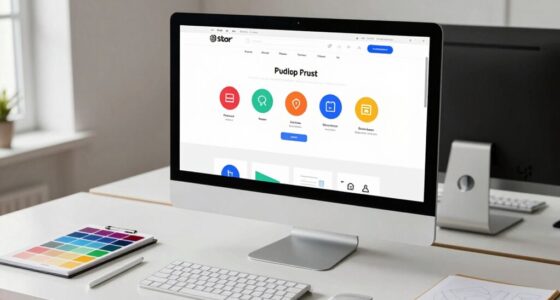

Making your website accessible guarantees everyone can navigate and enjoy your content, regardless of their abilities or disabilities. By designing with inclusive features like high contrast colors, keyboard-friendly navigation, and descriptive alt text, you create an environment that welcomes all users. Incorporating assistive technologies seamlessly into your site helps those with visual or motor impairments access information effectively. Keep exploring to discover practical ways to build truly inclusive digital experiences for everyone.
Key Takeaways
- Incorporate semantic HTML tags and descriptive alt text to improve content clarity for assistive technologies.
- Use high-contrast color schemes and patterns to enhance readability for users with visual impairments.
- Ensure all interactive elements are accessible via keyboard navigation with visible focus indicators.
- Design inclusive content that accommodates diverse abilities, fostering equal access and participation.
- Regularly test website accessibility to meet standards like WCAG and create seamless experiences for all users.

Accessibility in web design is essential for ensuring that all users, regardless of their abilities or disabilities, can navigate and interact with websites effectively. When you prioritize accessibility, you create an inclusive environment where everyone has equal access to information and services. A key part of this effort involves understanding how assistive technologies work and how to design with contrast in mind. Assistive technologies, such as screen readers, magnifiers, and alternative input devices, are crucial tools that help users with disabilities access digital content. Your job is to make sure your website integrates seamlessly with these technologies, enabling users to obtain the same information and functionality as those without disabilities. For example, by providing descriptive alt text for images, you ensure screen readers can convey visual content to users who cannot see it. Similarly, structuring your HTML properly with semantic tags helps assistive devices interpret the content correctly.
Color contrast is another critical aspect of accessibility. When designing your website, you need to make certain that text and background colors have sufficient contrast to be easily readable by everyone, including users with visual impairments or color blindness. Low contrast can make it difficult for users to distinguish content, leading to frustration and a poor experience. You can check contrast ratios using online tools and adjust your color schemes to meet WCAG (Web Content Accessibility Guidelines) standards. Avoid color combinations that can be confusing or indistinguishable for users with color vision deficiencies. Instead, use high-contrast palettes and consider adding patterns or labels to convey information that relies on color alone.
Ensuring your website is compatible with assistive technologies and maintaining proper color contrast are fundamental steps toward creating an accessible digital space. You should also think about keyboard navigation, as many users with disabilities depend on keyboard controls instead of a mouse. Making sure that all interactive elements are accessible via keyboard allows everyone to navigate your site smoothly. Focus indicators, clear navigation order, and logical tab sequences make this possible. When you design with assistive technologies and color contrast in mind, you’re not just ticking boxes—you’re actively removing barriers that prevent full participation. This commitment not only broadens your audience but also demonstrates your respect for diverse user needs. Accessibility isn’t an afterthought; it’s a core part of good web design that benefits everyone. By paying attention to assistive technologies and maintaining proper color contrast, you help create a digital space that’s welcoming, usable, and equitable for all users.

Sooez Large Pencil Case, Pencil Pouch, Pencil Bag, Pencil Box, Pink & Plaid
- Ample Storage Capacity: Holds 60 pencils, pens, and accessories
- Organized Structure: Multiple zippered pockets and elastic loops
- Large Main Compartment: Wide opening for easy access and organization
As an affiliate, we earn on qualifying purchases.
Frequently Asked Questions
How Do Color Choices Impact Web Accessibility?
Color choices directly impact web accessibility by affecting color contrast and visual cues. When you select high contrast colors, it helps users with visual impairments distinguish content easily. Avoid relying solely on color to convey information, as it can be missed by colorblind users. By ensuring good contrast and clear visual cues, you create an inclusive experience that everyone can navigate comfortably and efficiently.
What Are the Best Tools for Testing Accessibility?
You should use tools like WAVE, Axe, and Lighthouse to test accessibility. These tools help you identify issues that might affect Assistive Technologies and guarantee your site meets Accessibility Guidelines. By running these tests regularly, you can catch problems early, improve user experience, and create more inclusive web experiences. Remember, consistently testing helps you stay compliant and accessible for all users, regardless of their abilities.
How Can Mobile Responsiveness Improve Accessibility?
Think of your website as a versatile bridge connecting everyone. Mobile responsiveness acts like an adaptable path, ensuring users navigate smoothly regardless of device. By implementing adaptive layouts and voice navigation, you make it easier for people with visual or motor impairments to access content. This way, you’re opening your digital space to all, creating a seamless, inclusive experience that truly bridges gaps and welcomes everyone with open arms.
What Are Common Accessibility Mistakes to Avoid?
You should avoid common accessibility mistakes like neglecting keyboard navigation, which makes your site hard to use for many users. Always include alternative text for images so screen readers can describe visuals accurately. Don’t overlook color contrast, as poor contrast hampers readability. Test your website regularly with accessibility tools and involve diverse users to identify issues early, ensuring an inclusive experience for everyone.
How Does Accessibility Influence SEO Rankings?
Accessibility boosts your SEO rankings because search engines favor websites that are easy to navigate and understand. When you add descriptive alt text to images, you improve your content’s relevance and discoverability. Ensuring keyboard navigation allows users with disabilities to access your site seamlessly, reducing bounce rates and increasing engagement. These practices not only make your website more inclusive but also enhance its visibility in search results, benefiting your overall SEO strategy.

Citylife 17QT Clear Craft Organizers and Storage Box with Removable Tray
- Multi-layer separation design: Removable tray with 5 compartments
- 17-Quart Capacity: Large storage for various supplies
- Versatile storage solution: Ideal for crafts, tools, and medicines
As an affiliate, we earn on qualifying purchases.
Conclusion
By embracing accessibility in web design, you open the door to a world where everyone can participate fully, regardless of their abilities. Think of your website as a bridge—built with care and consideration—connecting diverse users to your content. When you prioritize inclusive experiences, you don’t just meet standards; you create a welcoming environment that lifts everyone up. Remember, accessibility isn’t just a feature—it’s the heartbeat of truly universal design.
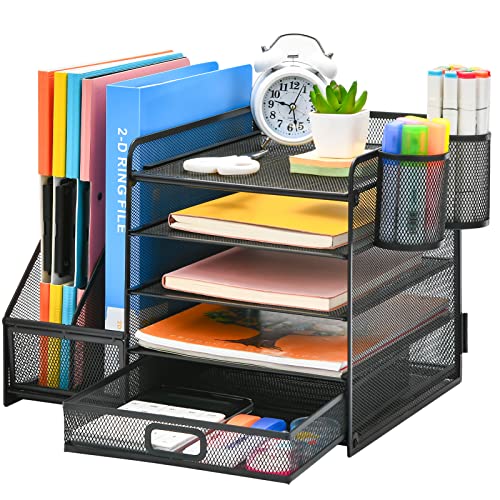
Marbrasse Desk Organizer with File Holder, 5-Tier Paper Letter Tray Organizer with Drawer and 2 Pen Holder, Mesh Desktop Organizer and Storage with Magazine Holder for Office Supplies(Black)
- Multi-Tier Desk Organizer: 5 sliding trays, 2 magazine holders, 2 pen holders, 1 drawer
- Space-Saving Design: Vertical file holder for documents and magazines
- Ample Storage Capacity: Stores books, letters, A4 paper, and office supplies
As an affiliate, we earn on qualifying purchases.
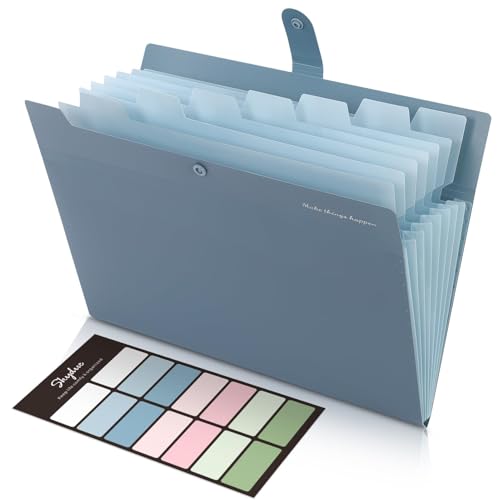
SKYDUE Expanding File Organizer with 8 Pockets, Accordion File Folders with Labels, Portable Document Paper Bill Receipt Organizer, Home College School Office Supplies, Letter Size, Blue
- Size: 13 x 10 x 0.7 inches
- Fits A4 and Letter Paper: Accommodates standard documents
- Includes Labels: Easy categorization of files
As an affiliate, we earn on qualifying purchases.